CDK CI/CD Wrapper
Introduction
The CDK CI/CD Wrapper is a comprehensive CI/CD platform for AWS CDK-based applications and solutions. It is config-driven and zero-touch: you describe your pipeline in one cicd.config.ts file, and the cdk-cicd CLI wraps it around your unmodified CDK app. It provides a standardized and easy-to-use Continuous Integration solution leveraging AWS CodeBuild — the process ensures that the codebase follows code style guidelines, can be successfully compiled, runs supplied tests, and performs various quality checks related to security.
Once the codebase successfully passes the quality gates, the CDK CI/CD Wrapper enables Continuous Deployment of the solution across the stages you define — for example dev, int, and prod — gating every stage that isn't an inner-loop stage behind a manual approval by default.
Why use the CDK CI/CD Wrapper?
Setting up CI/CD pipelines for AWS CDK-based projects is a recurring and time-consuming activity for many teams. This process often results in different "flavors" of pipelines, leading to duplicated effort and increased maintenance and governance complexity.
The CI/CD process setup is often thought of as a one-time activity, but in reality, it is a continuous process that needs to be done systematically.
The CDK CI/CD Wrapper can address these issues and drastically reduce the effort needed to maintain and develop AWS CDK-based solutions, allowing you to focus on your solution while it takes care of the CI/CD process.
Here are some key features provided by the CDK CI/CD Wrapper:
 Zero wrapper code in your app (TypeScript/JavaScript apps) — your
 bin/stays exactly whatcdk initproduced; the pipeline lives in a separatecicd.config.ts. Non-Node apps (e.g. Python) use the explicitCdkCicd.attach(app)opt-in instead — see Getting Started- Customizable CI steps that default to your project's own npm scripts (
npm run audit/build/test) - Integration of various security scanning tools (cdk-nag, Bandit, Semgrep, ShellCheck, dependency-vulnerability scanning)
- Multi-staged Continuous Deployment process with manual-approval gating on by default for anything past your inner development loop
- Flexible definition of stages, including multi-region stages and per-stage AWS accounts
- A choice of pipeline engines — a lightweight CodePipeline by default, a CDK Pipelines-based engine, or a GitHub Actions engine that renders a workflow file instead of an AWS-hosted pipeline
- Automated Open Source License checking (with a provided list of licenses that should not be present in your PRODUCTION workloads)
- Optional centralized compliance/access-log bucket, VPC, and HTTP proxy support for every CodeBuild project the pipeline creates
- Dependency vulnerability scanning in the CI/CD for Node.js and Python dependencies (in case of CVE findings, block the pipeline)
Most of these features can be used independently of the CDK constructs, directly through the CDK CI/CD Wrapper CLI.
CI/CD Process Overview
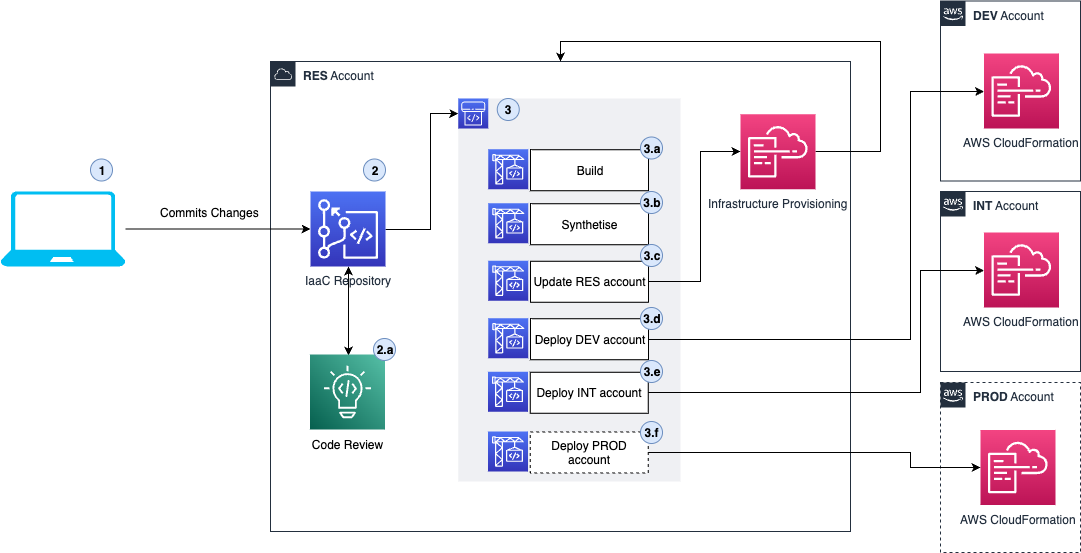
Note
This diagram predates Autopilot (1.x) and still shows Blueprint (0.x) specifics — a CodeCommit-only
source, Amazon CodeGuru code review, and fixed RES/DEV/INT/PROD accounts. The pipeline shape
(source → build/synth → self-update → one deploy action per stage, gated by manual approval) still
holds; the account names, the CodeCommit-only source, and CodeGuru do not — see the stage list below.
Redrawing this diagram for Autopilot is tracked separately.
The CI/CD process in the CDK CI/CD Wrapper establishes the following:
- Changes are committed to the Git repository in a branch, and a Pull Request (PR) is created for the tracked branch (
mainby default). - The PR is reviewed, approved, and merged.
- Once the codebase is merged, the pipeline is triggered to execute the CI/CD process:
- Build: This is the Continuous Integration step, which runs your configured
ci.stepsor, by default, your project's own npm scripts (npm run audit/build/test, each run-if-present) to ensure code quality and security before deployment to any stage. - Synthesize: This step executes
cdk synthand runs CDK Nag to promote infrastructure best practices. - Self-update: The pipeline updates its own definition from the latest
cicd.config.ts. - Deploy
<stage>(one action per configured stage): Updates the infrastructure elements in that stage's account/region with AWS CloudFormation. Stages other than your inner-loop stages (e.g.dev/res) are gated by a manual approval by default.
Infrastructure Elements
The CDK CI/CD Wrapper architecture is based on using DevOps services provided by AWS to deliver the CI/CD solution.
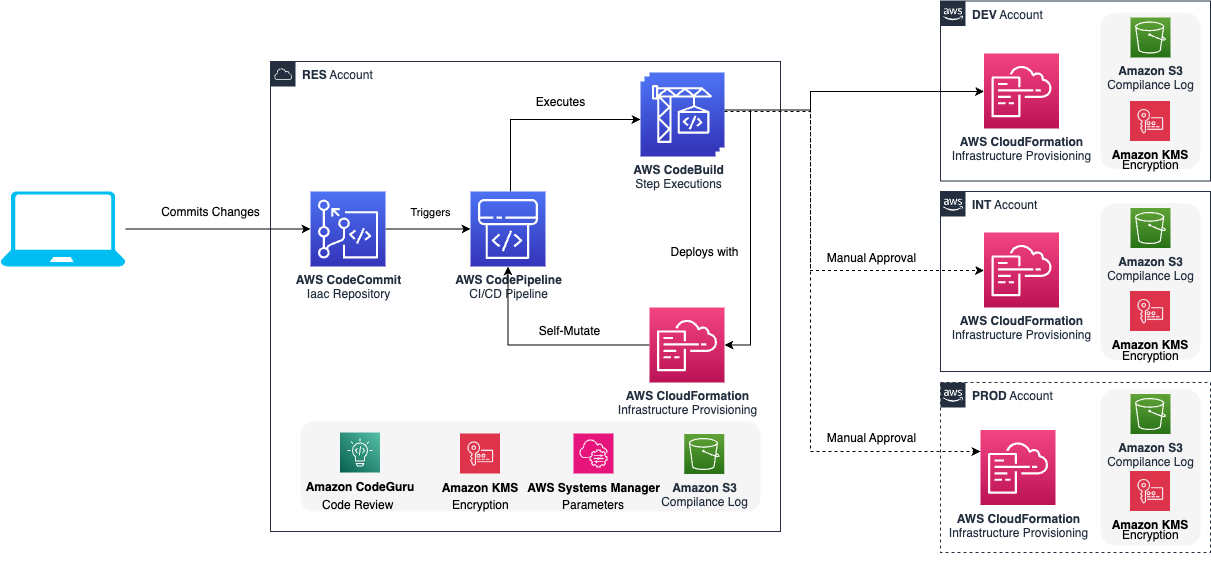
Note
Like the process-flow diagram above, this one predates Autopilot (1.x): it shows a CodeCommit-only
source with Amazon CodeGuru code review and a per-account compliance bucket/KMS key created
unconditionally. In Autopilot the source is a choice (CodeCommit, GitHub, S3, or any CodeStar
connection), there is no CodeGuru integration, and the compliance bucket/KMS encryption are opt-in
(complianceLogBucketName in cicd.config.ts). Redrawing this diagram for Autopilot is tracked
separately.
You can read more about these elements in the Developer Guide.
Getting Started
If you are eager to start using the CDK CI/CD Wrapper, check out the Getting Started guides.
Contributing to the CDK CI/CD Wrapper
The team encourages you to contribute to make it an even better framework. For details, see contributing.