Git Branching Strategies
The CDK CI/CD Wrapper can be used with git branching strategies as described below.
Trunk-Based Development
Trunk-based development has no branches, and changes are committed directly to the main trunk. One cicd.config.ts with default options covers this:
import { defineCICD, Repository } from '@cdklabs/cdk-cicd-wrapper';

export default defineCICD({
  application: 'my-app',
  repository: Repository.codecommit('my-repo'), // tracks 'main' by default
  stages: ['dev', 'int'],
});
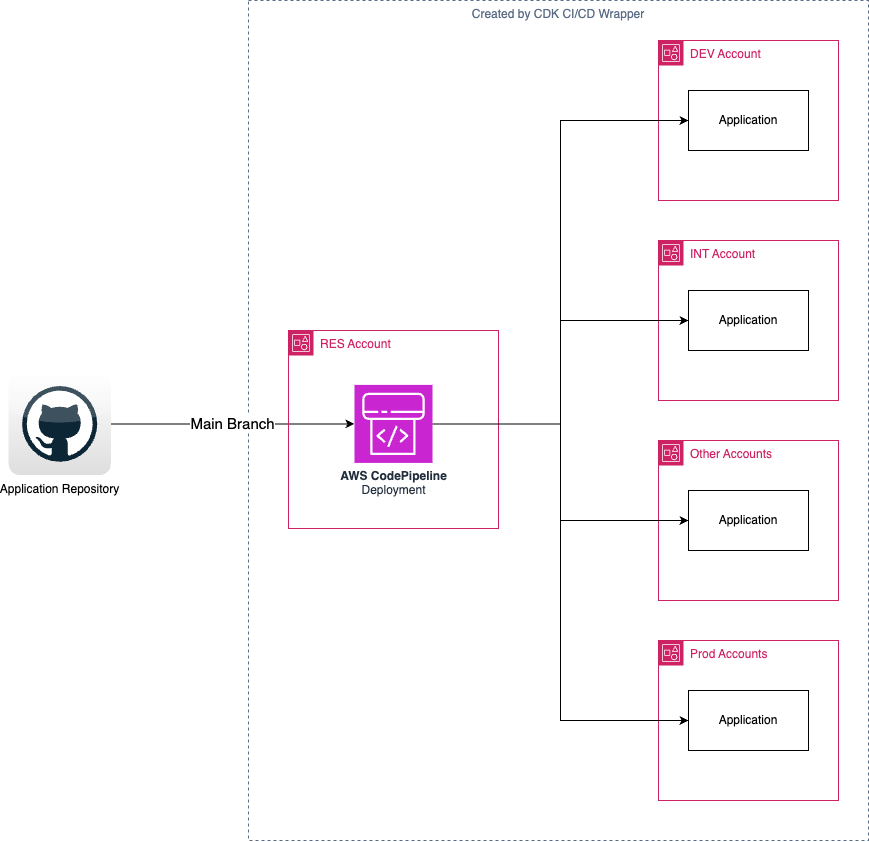
Git(x)Flow Feature Branches
GitFlow, GitHub Flow and GitLab Flow are development methodologies where work happens on branches that merge into the main trunk when ready for production. There are two ways to use the CDK CI/CD Wrapper with these methodologies.
Local ad hoc deploys (no pipeline)
Blueprint (0.x) had a .workbench() section for deploying a feature branch's stacks directly from a developer's machine, without a pipeline. There is no equivalent construct in Autopilot — you don't need one, because cdk.json's app command (npx cdk-cicd exec bin/my-app.ts) already runs every cdk invocation through the wrapper, pipeline or not. Deploy ad hoc straight from your branch:
npx cdk deploy --all
This deploys with whatever CDK_STAGE/AppConfig resolves to locally (the local stage, absent an override — see AppConfig). Give the stack a distinct name (for example suffixed with your username) if you don't want it colliding with a pipeline-managed stack of the same base name:
new MyStack(app, 'my-app', { stackName: `my-app-${process.env.USER}` });
Note
Unlike Blueprint's .workbench(), this has no built-in per-user resource prefixing, no automatically-created compliance/encryption stacks, and no workbench destroy — clean up with cdk destroy yourself.
Feature pipelines
A feature pipeline is a second, independent pipeline that tracks a feature branch instead of main, deployed with its own cicd.config.ts. Since cicd.config.ts is just a TypeScript file, keep the feature branch's copy uncommitted to trunk (the same convention Blueprint's .workbench() followed) — for example, a cicd.config.feature.ts you swap in locally, or a small branch-name check inside cicd.config.ts itself:
// cicd.config.ts, on a feature branch only -- not merged back to main
import { defineCICD, Repository } from '@cdklabs/cdk-cicd-wrapper';

export default defineCICD({
  application: 'my-app-feature1', // distinct application/qualifier avoids clashing with the main pipeline
  qualifier: 'f1app',
  repository: Repository.codestarConnection('org/my-app', 'arn:aws:codestar-connections:...', 'feature1'),
  stages: [
    { name: 'feature1dev', env: { account: '222222222222', region: 'eu-west-1' }, manualApproval: false },
    { name: 'feature1int', env: { account: '333333333333', region: 'eu-west-1' }, manualApproval: true },
  ],
});
Run cdk-cicd deploy-ci from that branch's checkout to provision the feature pipeline. It builds and deploys its own copy of the stacks in bin//lib/ — the same source, a different pipeline.
Note
application/qualifiermust differ from the main pipeline's to avoid duplicate/clashing resources.- Stage names must be unique across pipelines sharing accounts/regions with the main pipeline.
- Resources must be cleaned up manually (deleting the CloudFormation stacks in the accounts where they were created) when the feature branch merges or is abandoned.
Developer sandbox pipelines
The same feature-pipeline pattern also covers a per-developer sandbox: point repository at the developer's branch and stages at their personal sandbox account. Unlike Blueprint (0.x) — where the compliance/access-log bucket was on by default and had to be explicitly disabled (GlobalResources.COMPLIANCE_BUCKET) to run a pipeline and its deployment target in the same account — Autopilot's compliance bucket is opt-in (complianceLogBucketName in cicd.config.ts), so simply leaving it unset avoids the conflict; there is nothing to disable.