A config-driven pipeline (Autopilot)
What you'll build
- A working CodePipeline for a stock CDK app, provisioned from a single
cicd.config.ts. - An understanding of every
defineCICDfield and when to reach for it. - A customized CI phase — your own named build steps and, optionally, a custom build image.
The whole Autopilot opt-in is two things: a cicd.config.ts, and pointing cdk.json at cdk-cicd exec.
1. Your app stays plain CDK
bin/app.ts is exactly what cdk init gave you — a plain App with your stacks. No PipelineBlueprint,
no builder, no wrapper import:
// bin/app.ts
import * as cdk from 'aws-cdk-lib';
import { MyStack } from '../lib/my-stack';

const app = new cdk.App();
new MyStack(app, 'my-app', {
  env: { account: process.env.CDK_DEFAULT_ACCOUNT, region: process.env.CDK_DEFAULT_REGION },
});
2. Describe the pipeline in cicd.config.ts
// cicd.config.ts
import { defineCICD, Repository } from '@cdklabs/cdk-cicd-wrapper';

export default defineCICD({
  application: 'my-app',
  repository: Repository.codecommit('my-app'), // or .s3('bucket/app.zip')
  stages: ['dev', 'prod'],
});
3. Point cdk.json at the wrapper's exec hook
{
  "app": "npx cdk-cicd exec bin/app.ts"
}
cdk-cicd exec runs your app under a preload that injects the resolved config (and tags, synthesizer, and
compliance Aspects) around it — which is how your untouched bin/ becomes wrapper-aware without importing
anything.
4. Provision the pipeline — once
npx cdk-cicd deploy-ci
This deploys one pipeline into your hub account from cicd.config.ts alone. On every run it:
Source → Build (checks + synth) → UpdatePipeline (re-deploys itself from config) → deploy dev → deploy prod
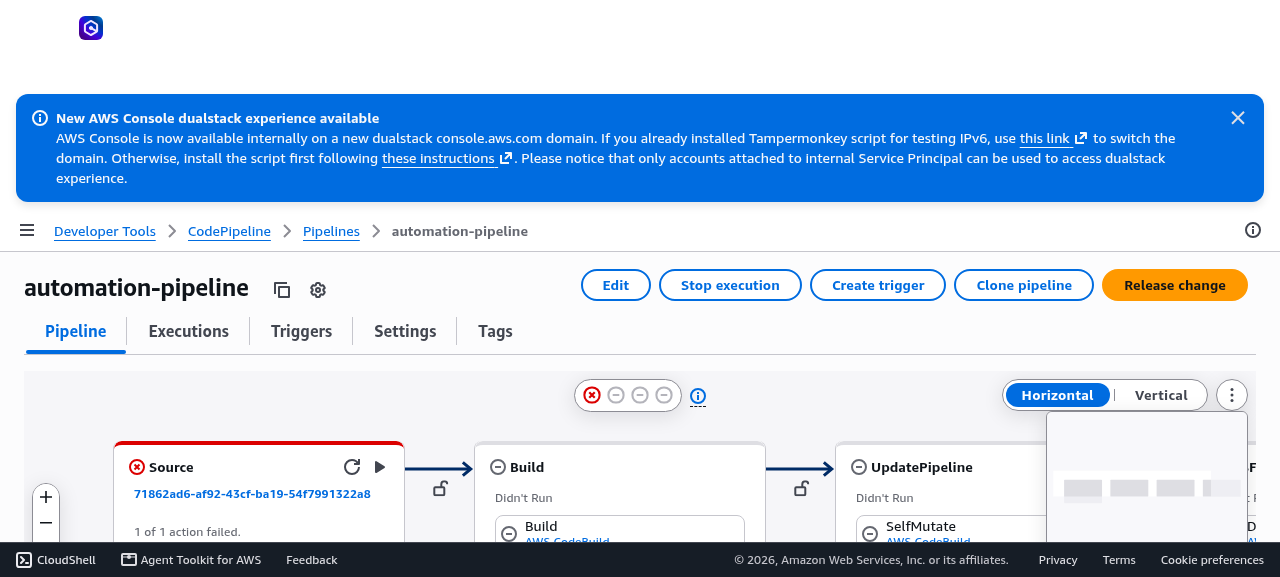
The flat Autopilot pipeline in the CodePipeline console — one linear pipeline, not Blueprint's 100+ CodeBuild projects.
The UpdatePipeline stage means you never run deploy-ci again by hand: change cicd.config.ts, push,
and the pipeline re-synthesizes its own definition on the next run and applies the change before the
stages it affects.
Every field of defineCICD
The two-stage example above uses three fields. Here is the full set, and why each matters — you'll only ever write the few you need, because the wrapper resolves sensible defaults for the rest.
| Field | What it does | Why it matters |
|---|---|---|
application |
Logical name for the app and its resources. Defaults from package.json#name. |
The prefix on pipeline and support-stack names — set it once so resources are recognizable. |
qualifier |
Short (≤10 char) sanitized bootstrap id. Derived from application; both synthesizers honor an explicit value. |
Set it when the target accounts use a non-default bootstrap qualifier. |
repository |
The pipeline's source: Repository.codestarConnection('org/repo', connectionArn, branch?) for GitHub with the AWS-hosted engines, Repository.codecommit(...), or Repository.s3(...). Repository.github(...) is reserved for GITHUB_ACTIONS. |
This is where the pipeline reads code and what triggers it — the one field you almost always set explicitly. |
stages |
Ordered list of deployment stages — bare names or objects with env, manualApproval, deployment. |
Your promotion path (dev → prod). Config-as-data, not pipeline code. Covered in the next chapter. |
ci |
Customizes the CI phase: steps, synthStages, image. |
Add your own build/test steps or a custom image. See Customizing CI below. |
codeArtifact |
Authenticates builds to a private CodeArtifact repo (domain, repository, account?, region?, npmScope?). |
Needed when your deps (or the wrapper itself, pre-release) live in a private registry. See chapter 4. |
deployModel |
DeployModel.ASSEMBLY_PROMOTION (default) or DeployModel.DEPLOY_TIME_SYNTH. |
Controls when synth happens — one synth per run vs per-stage at deploy time. See chapter 3. |
asyncDeploy |
boolean (default false). Hands the CloudFormation wait to a Lambda instead of holding a build. |
Saves build compute when the CloudFormation wait dominates. See chapter 3. |
synthesizer |
{ type?: SynthesizerType.DEFAULT \| SynthesizerType.APP_STAGING, appId?: string }. |
DEFAULT suits generated pipelines. APP_STAGING is limited to direct/local deployment and Repo 1 image-only builds; every generated deployment pipeline rejects it. |
engine |
Selects the CD engine (EngineType). |
EngineType.CODEPIPELINE is the default and covers most cases — you rarely set it. Two alternates exist: CDK_PIPELINES (plain CDK Pipelines, no CodePipeline-specific extras) and GITHUB_ACTIONS (renders a .github/workflows/deploy.yml instead of an AWS-hosted pipeline — see GitHub as source & CD engine). Tuning for the default engine lives on the stages and ci (chapter 3), not here. |
githubActions |
GitHub Actions engine config (roleName, subjectClaims, workflowTriggers, etc.). |
Only read when engine is EngineType.GITHUB_ACTIONS. |
deployerImage |
Turns the pipeline into a config-agnostic image builder (BuildImage.docker({...})). |
The container-mode entry point. See chapter 5. |
Start small
The minimum config is repository + stages. application defaults from package.json#name, the
engine defaults to CodePipeline, and the synthesizer defaults to DefaultStackSynthesizer. Add fields
only when a default doesn't fit.
APP_STAGING is not a generated-pipeline synthesizer
The installed alpha supports a custom bootstrap qualifier for direct/local cdk deploy, and Repo 1
may bake that configuration into a deployer image. Flat CodePipeline, Repo 2, CDK Pipelines, and
GitHub Actions deployment pipelines reject it. On the direct/local path, custom deployRole and
cfnExecutionRole values become the application stack's deployment identities. The separate
staging support stack uses caller/base credentials, and a deploy-role ExternalId is unsupported.
Customizing CI
The ci block shapes the Build phase. All three sub-fields are optional; with none set, the build runs
your project's own npm scripts (npm run audit/build/test, each run-if-present, warn-if-absent)
plus the synth step.
Named build steps (ci.steps) — a map of { name: shell-command }. Each entry becomes a named step
in the CI build, so you add project-specific gates without editing pipeline code:
import { defineCICD, Repository } from '@cdklabs/cdk-cicd-wrapper';

export default defineCICD({
  application: 'my-app',
  repository: Repository.codestarConnection(
    'my-org/my-app',
    'arn:aws:codestar-connections:eu-west-1:111111111111:connection/01234567-89ab-cdef-0123-456789abcdef',
  ),
  stages: ['dev', 'prod'],
  ci: {
    steps: {
      lint: 'npm run lint',
      test: 'npm test',
      audit: 'npx cdk-cicd check-dependencies',
    },
  },
});
A custom build image (ci.image) — point CI at your own CodeBuild image (a registry reference) when
you need tools the default image doesn't ship:
  ci: {
    image: 'public.ecr.aws/my-org/ci-node:20',   // custom CodeBuild image for CI steps
    steps: { test: 'npm test' },
  },
For an AWS-hosted engine, a private ECR ci.image must be in the pipeline account and the same Region
as its CodeBuild project. Public ECR references such as public.ecr.aws/... are not subject to the
private-repository pull contract. For an authenticated Docker Hub, GHCR, or custom registry image,
add ci.codeBuildImageCredentials with the complete ARN of a Secrets Manager secret containing
username and password (and encryptionKeyArn for a customer-managed KMS key). GitHub Actions uses
GitHub secret names under githubActions.buildContainerCredentials instead; it rejects CodeBuild image
IDs and private ECR job containers because those credentials cannot be established before the pull.
Synth scope (ci.synthStages) — 'all' synthesizes every stage as a validation gate; a list narrows
it to specific stages when synth cost matters. This interacts with the deploy model, so it's covered in
chapter 3.
The build image needs the AWS CLI
Steps like the CodeArtifact login and asset publishing shell out to the AWS CLI, which the default
CodeBuild image ships. If you set a custom ci.image, make sure the AWS CLI is on its PATH.
Verify
Verify
Confirm the pipeline exists and runs end to end:
- In the CodePipeline console, your pipeline shows the flat
Source → Build → UpdatePipeline → deploy dev → deploy prodshape. - The most recent execution reaches Succeeded on every stage.
- Compare the CodeBuild project count to a Blueprint pipeline: Autopilot provisions a small, constant set — not one per asset or per stage.
You can also validate the config locally before pushing:
npx cdk-cicd synth --all # synthesizes every stage from your config
Recap
You turned a stock CDK app into one flat CodePipeline with a single config file and a one-line cdk.json
change — no wrapper code in bin/. You know every defineCICD field, and you can add your own CI steps
and image. The next chapters go deep on the fields you'll reach for most: stages and approvals, deploy
models and tuning, private registries, and container mode.