Document Processing



Overview
The Document Processing L3 constructs provides a layered architectural approach for intelligent document processing workflows. The system offers multiple implementation levels to provide various functionality and enable users to customized at varying layers depending on their requirements - from abstract base classes to fully-featured agentic processing with tool integration.
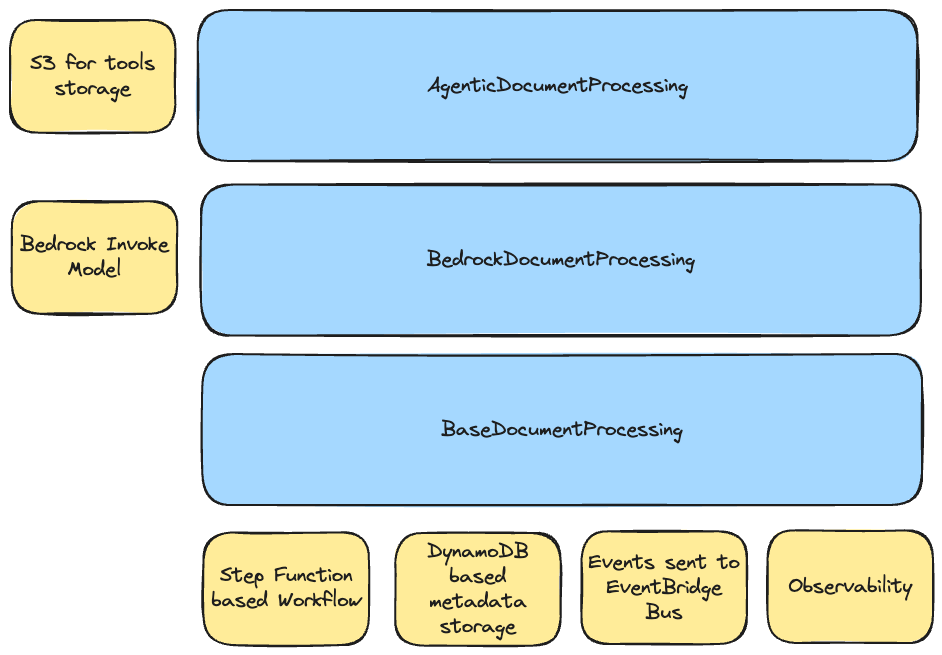
You can leverage the following constructs:
- BaseDocumentProcessing: Abstract foundation requiring custom step implementations
- BedrockDocumentProcessing: Ready-to-use genAI document processing implementation with Amazon Bedrock
- AgenticDocumentProcessing: Advanced agentic capabilities powered by the Agents Framework with BatchAgent integration
All implementations share common infrastructure: Step Functions workflow, DynamoDB metadata storage, EventBridge integration, and built-in observability.
Components
The following are the key components of this L3 Construct:
Ingress Adapter
The ingress adapter is an interface that allows you to define where the data source would be coming from. There's a default implementation already that you can use as a reference: QueuedS3Adapter.

The QueuedS3Adapter basically does the following:
- Creates a new S3 Bucket (if one is not provided during instantiation)
- Creates 2 SQS Queues, the primary SQS Queue that would receive events from the S3 Bucket, and the Dead Letter Queue incase of processing failure.
- Creates a Lambda function that will consume from SQS and trigger the Document Processing State Machine.
- Provides State Machine
chainto handle both success and failure scenarios. In the case of theQueuedS3Adapter, the following are the expected behavior:- Success: move the file to the
processedprefix and delete from therawprefix. - Failure: move the file to the
failedprefix and delete from therawprefix.
- Success: move the file to the
- IAM
PolicyStatementandKMSencrypt and decrypt permissions for the classification/processing Lambda functions as well as the State Machine role.
If no Ingress Adapter is provided, the Document Processing workflow would use the QueuedS3Adapter as the default implementation. That means that users would use S3 as the point of input for the document processing workflow to trigger.
Supporting other types of ingress (eg. streaming, micro-batching, even on-prem data sources) would require implementing the IAdapter interface. Once implemented, instantiate the new ingress adapter and pass it to the document processing L3 construct.
Workflow
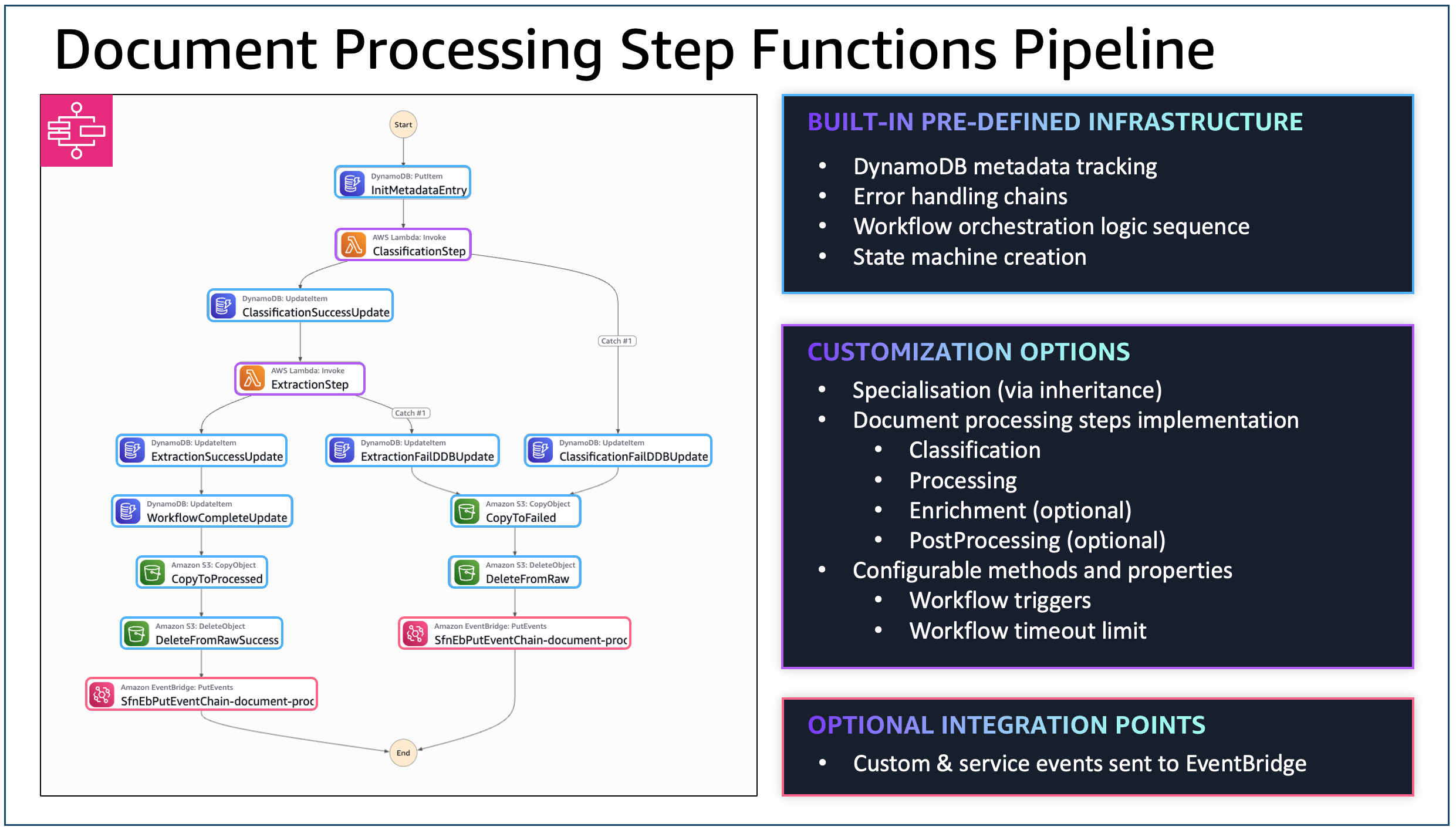
At a high-level, regardless which implementation you're using, the core workflow's structure are as follows:

- Classification: Determines document type/category for routing decisions
- Processing / Extraction: Extracts and processes information from the document
- Enrichment: Enhances extracted data with additional context or validation
- Post Processing: Final processing for formatting output or triggering downstream systems
Here is an example of the workflow and customisability points:
Payload Structure
For S3 based ingress, the following is an example payload that would be sent to the state machine:
{
    "documentId": "auto-generated document id",
    "contentType": "file",
    "content": {
        "location": "s3",
        "bucket": "s3 bucket name",
        "key": "s3 key including prefix",
        "filename": "filename"
    },
    "eventTime": "s3 event time",
    "eventName": "s3 event name",
    "source": "sqs-consumer"
}
For non-file based ingress (eg. streaming), the following is an example payload:
{
    "documentId": "auto-generated document id",
    "contentType": "data",
    "content": {
        "data": "<content>"
    },
    "eventTime": "s3 event time",
    "eventName": "s3 event name",
    "source": "sqs-consumer"
}
Events (via EventBridge)
If an EventBridge broker is configured as part of the parameters of the document processing L3 Construct, the deployed workflow would automatically include points where the workflow would send events to the configured event bus.
The following are example structure of the event:
Successful
{
    "Detail": {
        "documentId": "sample-invoice-1759811188513",
        "classification": "INVOICE",
        "contentType": "file",
        "content": "{\"location\":\"s3\",\"bucket\":\"bedrockdocumentprocessing-bedrockdocumentprocessin-24sh7hz30zoi\",\"key\":\"raw/sample-invoice.jpg\",\"filename\":\"sample-invoice.jpg\"}"
    },
    "DetailType": "document-processed-successful",
    "EventBusName": "<ARN of the event bus>",
    "Source": "intelligent-document-processing"
}
Failure
{
    "Detail": {
        "documentId": "sample-invoice-1759811188513",
        "contentType": "file",
        "content": "{\"location\":\"s3\",\"bucket\":\"bedrockdocumentprocessing-bedrockdocumentprocessin-24sh7hz30zoi\",\"key\":\"raw/sample-invoice.jpg\",\"filename\":\"sample-invoice.jpg\"}"
    },
    "DetailType": "document-processing-failed",
    "EventBusName": "<ARN of the event bus>",
    "Source": "intelligent-document-processing"
}
BaseDocumentProcessing Construct
The BaseDocumentProcessing construct is the foundational abstract class for all document processing implementations. It provides complete serverless document processing infrastructure and takes care of the following:
- Initializes and calls the necessary hooks to properly integrate the Ingress Adapter
- Initializes the DynamoDB metadata table
- Initializes and configures the various Observability related configuration
- Provides the core workflow scaffolding
Implementation Requirements
If you're directly extending this abstract class, you must provide concrete implementations of the following:
classificationStep(): Document type classification (required)ResultPathshould be$.classificationResult
processingStep(): Data extraction and processing (required)ResultPathshould be$.processingResult
enrichmentStep(): Optional data enrichmentResultPathshould be$.enrichedResult
postProcessingStep(): Optional final processingResultPathshould be$.postProcessedResult
Each function must return one of the following:
Configuration Options
- Ingress Adapter: Custom trigger mechanism (default:
QueuedS3Adapter) - Workflow Timeout: Maximum execution time (default: 30 minutes)
- Network: Optional VPC deployment with subnet selection
- Encryption Key: Custom KMS key or auto-generated
- EventBridge Broker: Optional event publishing for integration
- Observability: Enable logging, tracing, and metrics
BedrockDocumentProcessing Construct
The BedrockDocumentProcessing construct extends BaseDocumentProcessing and uses Amazon Bedrock's InvokeModel for the classification and processing steps.
Key Features
- Inherits: All base infrastructure (S3, SQS, DynamoDB, Step Functions)
- Implements: Classification and processing steps using Bedrock models
- Adds: Cross-region inference, custom prompts, Lambda integration
Configuration Options
You can customize the following:
- Classification Model: Bedrock model for document classification (default: Claude 3.7 Sonnet)
- Processing Model: Bedrock model for data extraction (default: Claude 3.7 Sonnet)
- Custom Prompts: Override default classification and processing prompts
- Cross-Region Inference: Enable inference profiles for high availability
- Step Timeouts: Individual step timeout configuration (default: 5 minutes)
- Lambda Functions: Optional enrichment and post-processing functions
Example Implementations
AgenticDocumentProcessing Construct
The AgenticDocumentProcessing construct extends BedrockDocumentProcessing to provide advanced agentic capabilities using the Agents Framework.
Key Features
- Inherits: All Bedrock functionality (models, prompts, cross-region inference)
- Reuses: Classification step from parent class unchanged
- Overrides: Processing step with BatchAgent from the Agents Framework
- Integrates: Full tool ecosystem with dynamic loading and execution
The processing step is now powered by a BatchAgent that can leverage custom tools, system prompts, and advanced reasoning capabilities.
Configuration Options
Instead of direct Bedrock model configuration, you now provide processingAgentParameters:
interface AgenticDocumentProcessingProps extends BedrockDocumentProcessingProps {
  readonly processingAgentParameters: BatchAgentProps;
}
Agent Configuration:
- Agent Name: Unique identifier for the processing agent
- System Prompt: S3 Asset containing agent instructions
- Tools: Array of S3 Assets with Python tool implementations
- Lambda Layers: Additional dependencies for tool execution
- Processing Prompt: Specific task instructions for the agent
- Expect JSON: Enable automatic JSON response parsing
Example Implementations
- Agentic Document Processing
- Full-Stack Insurance Claims Processing
- Fraud Detection
- Document Summarization Pipeline
PDF Chunking for Large Documents
The BedrockDocumentProcessing and AgenticDocumentProcessing constructs support automatic PDF chunking for processing large documents that exceed Amazon Bedrock model limits.
When to Use Chunking
Enable chunking when processing:
- Large PDFs: Documents with more than 100 pages
- Token-heavy documents: Documents exceeding ~150,000 tokens
- Variable density documents: Documents with mixed content (text, images, tables)
- Complex documents: Technical manuals, legal contracts, research papers
Enabling Chunking
import { BedrockDocumentProcessing } from '@cdklabs/cdk-appmod-catalog-blueprints';

// Enable chunking with default configuration
new BedrockDocumentProcessing(this, 'DocProcessor', {
  enableChunking: true,
});

// Enable chunking with custom configuration
new BedrockDocumentProcessing(this, 'DocProcessor', {
  enableChunking: true,
  chunkingConfig: {
    strategy: 'hybrid',
    pageThreshold: 50,
    tokenThreshold: 100000,
    processingMode: 'parallel',
    maxConcurrency: 5,
  },
});
Chunking Strategies
The chunking system supports three strategies, each optimized for different document types:
Strategy Comparison Table
| Strategy | Best For | Analysis Speed | Token Accuracy | Complexity |
|---|---|---|---|---|
| hybrid (recommended) | Most documents | Moderate | High | Medium |
| token-based | Variable density | Slower | Highest | Medium |
| fixed-pages (legacy) | Uniform density | Fastest | Low | Simple |
1. Hybrid Strategy (RECOMMENDED)
The hybrid strategy balances both token count and page limits, making it the best choice for most documents. It ensures chunks respect model token limits while preventing excessively large chunks.
How it works:
- Analyzes document to estimate tokens per page
- Creates chunks that target a specific token count
- Enforces a hard page limit per chunk
- Adds token-based overlap for context continuity
Configuration:
chunkingConfig: {
  strategy: 'hybrid',
  pageThreshold: 100,           // Trigger chunking if pages > 100
  tokenThreshold: 150000,       // OR if tokens > 150K
  targetTokensPerChunk: 80000,  // Aim for ~80K tokens per chunk
  maxPagesPerChunk: 99,         // Hard limit of 99 pages per chunk (Bedrock limit is 100)
  overlapTokens: 5000,          // 5K token overlap for context
}
Best for:
- General-purpose document processing
- Documents with mixed content density
- When you want balanced performance and accuracy
2. Token-Based Strategy
The token-based strategy splits documents based on estimated token count, ensuring no chunk exceeds model limits. Best for documents with highly variable content density.
How it works:
- Analyzes document to estimate tokens per page
- Creates chunks that don't exceed the maximum token limit
- Adds token-based overlap for context continuity
- Chunk sizes vary based on content density
Configuration:
chunkingConfig: {
  strategy: 'token-based',
  tokenThreshold: 150000,       // Trigger chunking if tokens > 150K
  maxTokensPerChunk: 100000,    // Max 100K tokens per chunk
  overlapTokens: 5000,          // 5K token overlap for context
}
Best for:
- Documents with variable content density
- Technical documents with code blocks
- Documents with many images or tables
- When token accuracy is critical
3. Fixed-Pages Strategy (Legacy)
The fixed-pages strategy uses simple page-based splitting. It's fast but may exceed token limits for dense documents.
How it works:
- Counts total pages in document
- Splits into fixed-size chunks by page count
- Adds page-based overlap for context continuity
- All chunks have the same number of pages (except the last)
Configuration:
chunkingConfig: {
  strategy: 'fixed-pages',
  pageThreshold: 100,  // Trigger chunking if pages > 100
  chunkSize: 50,       // 50 pages per chunk
  overlapPages: 5,     // 5 page overlap for context
}
Best for:
- Documents with uniform content density
- Simple text documents
- When processing speed is critical
- Legacy compatibility
⚠️ Warning: This strategy may create chunks that exceed model token limits for dense documents. Use hybrid or token-based strategies for better reliability.
Processing Modes
Control how chunks are processed:
| Mode | Description | Speed | Cost |
|---|---|---|---|
| parallel | Process multiple chunks simultaneously | Fast | Higher |
| sequential | Process chunks one at a time | Slow | Lower |
// Parallel processing (default) - faster but higher cost
chunkingConfig: {
  processingMode: 'parallel',
  maxConcurrency: 10,  // Process up to 10 chunks at once
}

// Sequential processing - slower but cost-optimized
chunkingConfig: {
  processingMode: 'sequential',
}
Aggregation Strategies
Control how results from multiple chunks are combined:
| Strategy | Description | Best For |
|---|---|---|
| majority-vote | Most frequent classification wins | General use |
| weighted-vote | Early chunks weighted higher | Documents with key info at start |
| first-chunk | Use first chunk's classification | Cover pages, headers |
chunkingConfig: {
  aggregationStrategy: 'majority-vote',  // Default
  minSuccessThreshold: 0.5,  // At least 50% of chunks must succeed
}
Configuration Defaults
When enableChunking is true but no chunkingConfig is provided, these defaults are used:
| Parameter | Default Value | Description |
|---|---|---|
strategy | 'hybrid' | Chunking strategy |
pageThreshold | 100 | Pages to trigger chunking |
tokenThreshold | 150000 | Tokens to trigger chunking |
chunkSize | 50 | Pages per chunk (fixed-pages) |
overlapPages | 5 | Overlap pages (fixed-pages) |
maxTokensPerChunk | 100000 | Max tokens per chunk (token-based) |
overlapTokens | 5000 | Overlap tokens (token-based, hybrid) |
targetTokensPerChunk | 80000 | Target tokens per chunk (hybrid) |
maxPagesPerChunk | 99 | Max pages per chunk (hybrid) - Bedrock limit is 100 |
processingMode | 'parallel' | Processing mode |
maxConcurrency | 10 | Max parallel chunks |
aggregationStrategy | 'majority-vote' | Result aggregation |
minSuccessThreshold | 0.5 | Min success rate |
Configuration Precedence
Configuration values are resolved in the following order (highest to lowest priority):
- Per-document configuration: Passed in the chunking request
- Construct configuration: Provided via
chunkingConfigprop - Environment variables: Set on the Lambda function
- Default values: Built-in defaults
Chunking Workflow
When chunking is enabled, the document processing workflow is enhanced:
┌─────────────────────────────────────────────────────────────────────────┐
│                        PDF Chunking Workflow                            │
├─────────────────────────────────────────────────────────────────────────┤
│                                                                         │
│  1. PDF Analysis & Chunking Lambda                                      │
│     ├─ Analyze PDF (page count, token estimation)                       │
│     ├─ Decide if chunking needed (based on thresholds)                  │
│     └─ If needed: Split PDF, upload chunks to S3                        │
│                                                                         │
│  2. Choice State: Requires Chunking?                                    │
│     ├─ NO  → Standard workflow (Classification → Processing)            │
│     └─ YES → Chunked workflow (see below)                               │
│                                                                         │
│  3. Chunked Workflow:                                                   │
│     ├─ Map State: Process each chunk                                    │
│     │   ├─ Classification (per chunk)                                   │
│     │   └─ Processing (per chunk)                                       │
│     ├─ Aggregation Lambda                                               │
│     │   ├─ Majority vote for classification                             │
│     │   └─ Deduplicate entities                                         │
│     ├─ DynamoDB Update (store aggregated result)                        │
│     └─ Cleanup Lambda (delete temporary chunks)                         │
│                                                                         │
│  4. Move to processed/ prefix                                           │
│                                                                         │
└─────────────────────────────────────────────────────────────────────────┘
DynamoDB Schema Extensions
When chunking is enabled, additional fields are stored in DynamoDB:
| Field | Type | Description |
|---|---|---|
ChunkingEnabled | String | Whether chunking was applied ("true"/"false") |
ChunkingStrategy | String | Strategy used (hybrid, token-based, fixed-pages) |
TokenAnalysis | String (JSON) | Token analysis results |
ChunkMetadata | String (JSON) | Array of chunk metadata |
AggregatedResult | String (JSON) | Final aggregated result |
Error Handling
The chunking system includes comprehensive error handling:
- Invalid PDF: Document moved to
failed/prefix with error logged - Corrupted PDF: Graceful handling with partial processing if possible
- Chunk processing failure: Continues with remaining chunks, marks result as partial
- Aggregation failure: Preserves individual chunk results
- Cleanup failure: Logs error but doesn't fail workflow (S3 lifecycle handles cleanup)
Observability
When chunking is enabled, additional CloudWatch metrics are emitted:
ChunkingOperations: Count of chunking operations by strategyChunkCount: Average and max chunks per documentTokensPerChunk: Average and p99 tokens per chunkChunkProcessingTime: Processing time per chunkChunkFailureRate: Percentage of failed chunksAggregationTime: Time to aggregate results
All log entries include documentId, chunkIndex, and correlationId for traceability.